
When is Prime Big Deal Days 2026 — and what it actually is
Prime Big Deal Days is Amazon's second Prime-exclusive sale of the year, run every year since 2022 in early-to-mid October as the unofficial start of Q4. Amazon typically confirms the exact dates only a few weeks ahead — in recent years it has landed in the first half of October as a 48-hour event. Treat "early October" as your planning anchor and watch Seller Central announcements for the confirmed dates.
Two things make it different from July's Prime Day. First, shoppers arrive earlier in their holiday research, so conversion rates are usually softer than July but the search-term data you collect is worth more — it previews what Q4 demand looks like for your catalog. Second, it is the last low-pressure rehearsal before Black Friday/Cyber Monday: every mistake you make here (budget cliffs, missing negatives, suppressed listings) is a mistake you can still fix before the expensive weeks.
Why the two weeks before matter more than the event
Amazon's ad auction doesn't reset on event morning. Campaigns enter Prime Big Deal Days with the click history, conversion data and relevance signals they earned in the weeks before — and the delivery the algorithm gives you during the spike reflects that history. A campaign that spent the lead-in riddled with un-negated waste terms pays event-level CPCs for the same junk clicks, just five times more of them.
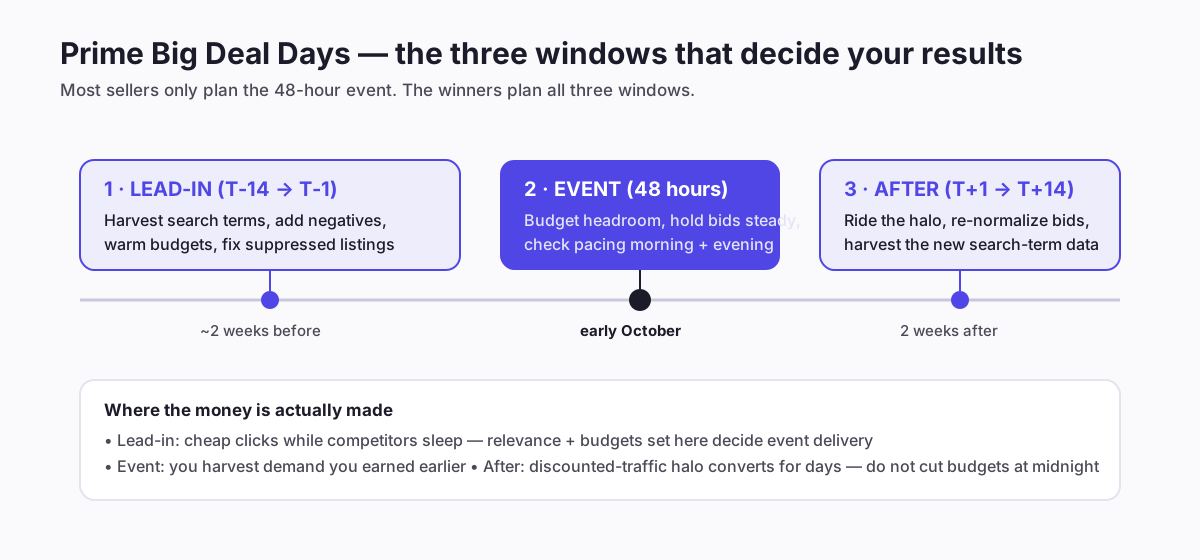
The practical consequence: your event work is 70% done before the event starts. The lead-in list below is where the leverage is — everything during the 48 hours is comparatively small adjustments.
Window 1 — the lead-in (T-14 to T-1)
Work through these in order, starting about two weeks out:
- Harvest and negate. Pull the last 60 days of the Sponsored Products search-term report from the Ads console (Measurement & Reporting → Sponsored ads reports). Sort by spend. Terms with meaningful clicks and zero orders become negative exact; converting terms trapped in auto campaigns graduate to manual exact with their own bids. The full method is in the negative keywords guide — and do not negate on thin data: a term with 5 clicks has proven nothing yet, and pre-event traffic patterns will shift anyway.
- Anchor on break-even, not vibes. Event CPCs run hotter. Know each product's break-even ACoS so you know how much auction inflation you can absorb before a sale stops being profitable — and compute it at your deal price, not list price. A 20% Prime-exclusive discount can cut your break-even ACoS nearly in half on a mid-margin product; sellers who skip this arithmetic celebrate event revenue and discover three weeks later, in the settlement data, that the incremental orders were sold at a loss.
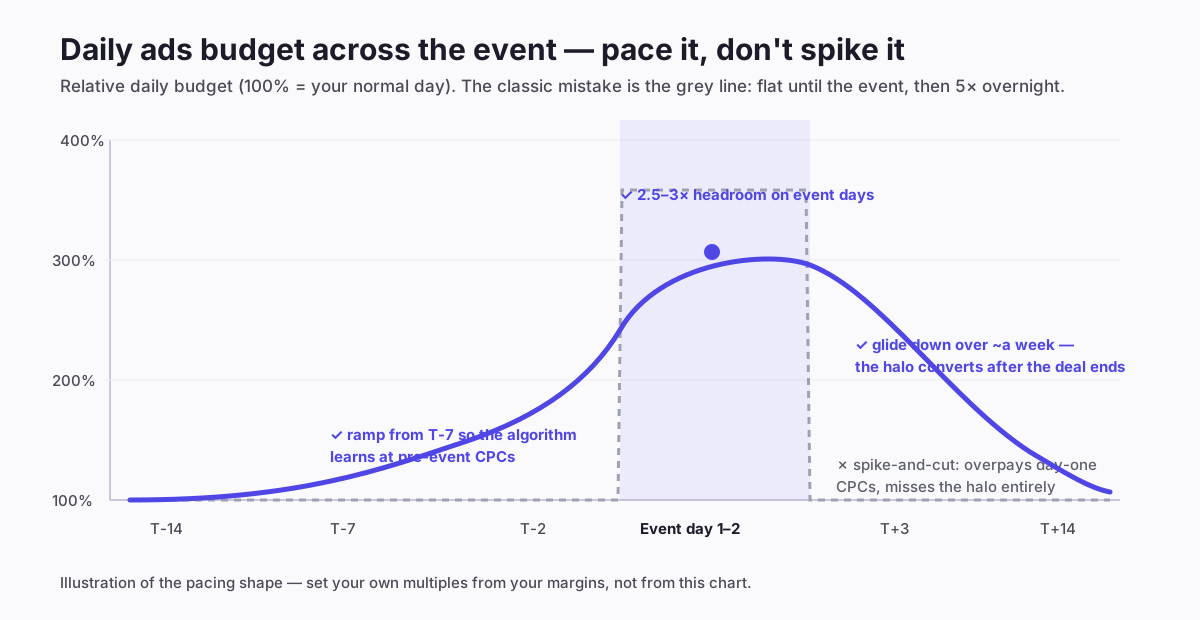
- Warm budgets gradually. Start lifting daily budgets ~25-50% around T-7 rather than 5× overnight on event morning. The algorithm re-learns delivery pacing at pre-event CPC prices instead of learning on your most expensive clicks of the quarter.
- Fix what ads can't fix. Suppressed variations, stranded inventory, thin main images, missing bullets — listing problems take days to resolve and silently cap conversion. The same goes for stock: if you can't cover 3-5× normal daily velocity, cap budgets deliberately rather than paying to advertise a listing that will stock out mid-event (see the forecast view).
- Check deal approval. A Prime-exclusive discount or coupon that silently failed approval means you're paying event CPCs to show a full-price listing next to competitors with 20%-off badges.
One more lead-in decision that saves money: decide now which products don't get event treatment. A product with thin stock, a weak offer, or an unresolved listing issue should keep its normal budget — every event dollar you don't spend on a compromised listing is a dollar available for the hero products that can actually convert the surge.
Sponsored Brands and Sponsored Display during the event
Most event advice is written for Sponsored Products, but the other two formats behave differently under surge traffic and deserve their own plan:
- Sponsored Brands: headline placements get dramatically more valuable during events because category browse volume rises more than long-tail search. If you run a Store, point the ad at a Store page with your deal items front and centre — sending event traffic to a single-product page wastes the cross-sell moment. Video creative that shows the product in the first two seconds tends to hold up best against the deal-hunting scroll behaviour of event shoppers.
- Sponsored Display: the retargeting audiences (views remarketing especially) are the quiet winner of event weeks. Shoppers browse far more than they buy during the lead-in, which fills your views audiences cheaply; during the event, those warmed audiences convert at the deal price. If you switch on nothing else in Sponsored Display, switch on views remarketing for your deal products in the lead-in window.
Keep the reporting honest, though: both formats attribute generously during high-traffic weeks. Judge them on the same TACoS lens you use for everything else, not on their own attributed-sales screens.
Window 2 — the 48 hours: what to touch and what to leave alone
Event days reward restraint. The three moves that matter:
- Budget headroom, checked twice a day. The one unforgivable event error is a winning campaign hitting its budget cap at 2pm and going dark for the evening peak — the cheapest hours of the event are often the late ones, after less-prepared competitors have exhausted their budgets. Check pacing in the morning and again mid-afternoon.
- Hold bids mostly steady. If you prepared in the lead-in, your bids already reflect real conversion rates. Chasing the auction upward mid-event usually buys the same impressions at worse prices. Reserve manual bid pushes for your one or two proven hero products where the deal is strong and stock is deep.
- Watch by the hour where you can. Event traffic is not evenly distributed across the day. If you have dayparting in place, let it shift spend toward converting hours; if you're manual, the morning/evening pacing checks above are the minimum viable version.
Window 3 — the halo week: the profit most sellers throw away
Traffic doesn't fall off a cliff at midnight — shoppers who clicked during the event come back, and Amazon's systems keep rewarding recent velocity with better organic placement for days. Cutting budgets back to normal the morning after hands that halo to whoever kept spending.
- Glide budgets down over ~a week instead of cutting to baseline on day one. Watch your realized ACoS daily and step down as conversion normalizes.
- Harvest immediately, and in two passes. The event generated more search-term data in 48 hours than a normal fortnight. Do a first pass at T+2 for the obvious moves — new converting terms become exact-match targets while their conversion evidence is fresh, new waste terms become negatives. Then do a second pass around T+10, once Amazon's attribution window has caught up: event shoppers convert late, and a term that looked like waste on day two often shows its orders a week later. Acting only on the T+2 snapshot is how sellers negate their future BFCM winners.
- Mind the organic-rank window. The sales velocity you just bought improves organic rank for exactly as long as you defend it. The halo week is the cheapest time to consolidate a page-one position you paid event prices to reach — going dark instead lets the ranking decay back to wherever it was.
- Write down what broke. Budget caps you hit, listings that suppressed, deals that under-delivered — this is your BFCM rehearsal report, and you have roughly six weeks to fix it. Keep it honest with the true-profit view rather than the dashboard's attributed-sales number.
Budget pacing by the numbers — a worked shape, not a magic multiplier
There is no universal "raise budgets X%" answer, because the right headroom depends on your margins and deal depth. But the shape generalizes:
- T-14 → T-8: normal budgets. Spend the time on negatives and listing fixes, not spend increases.
- T-7 → T-2: lift daily budgets ~25-50% on campaigns that are already profitable. This is calibration, not aggression — you want the algorithm pacing comfortably above baseline before the auction heats up.
- Event days: give proven campaigns 2.5-3× normal daily budget as headroom — money they're allowed to spend if delivery justifies it, not a target to burn. Underprepared campaigns don't deserve event multipliers at all; event CPCs are the worst possible tuition.
- T+1 → T+7: step down ~20-30% per day-pair as conversion normalizes, watching ACoS against your break-even rather than against the event's inflated sales.
If your ACoS target itself is fuzzy, settle that first — the lower-ACoS guide covers how to set a target your margins can actually support, and the ACoS calculator does the arithmetic.
The non-ads checklist that decides your event
Every October, well-run campaigns get sunk by things outside the ads console. Four checks, all belonging to the lead-in window:
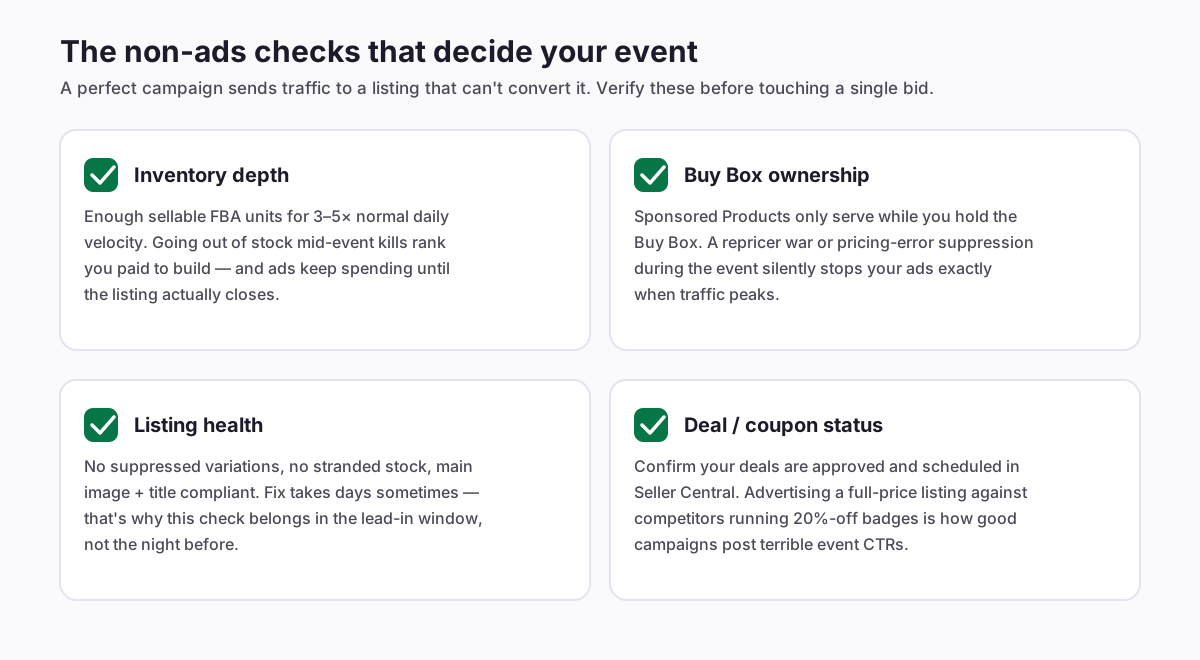
The Buy Box one deserves emphasis: Sponsored Products only serve while you hold the Buy Box, so a repricer war or a pricing-error suppression during the event turns your ads off precisely when traffic peaks — and nothing in the ads console tells you why impressions died. If you use an automated repricer, set its floor consciously before the event; a floor set months ago at list-price economics can chase a competitor below your deal price and suppress your own offer mid-surge.
Inventory deserves a second word too. Amazon's inbound processing slows measurably in the weeks before big events as every seller ships stock in at once — a shipment that normally checks in within days can sit in "receiving" for two weeks in late September. Whatever your restock forecast says the event needs, it needs it checked in, not in transit.
Running this hands-off
Everything above is doable manually — it's "just" a search-term harvest, staged budget changes, twice-daily pacing checks, hourly-ish bid attention, and a post-event harvest, across every campaign you run. The honest problem is that the lead-in work lands in the exact weeks when you're also managing deals, inventory and creative for Q4.
This is the category of work Amazon PPC automation exists for: AIAdKing's nightly cycle does the harvesting, negation and bid-to-conversion-rate math continuously, so the event windows above become budget decisions instead of spreadsheet marathons — and shadow mode shows you every proposed change before it goes live, which matters most in exactly these high-stakes weeks. Flat monthly fee, no percentage of your event spend.