
The formula: what a click is actually worth
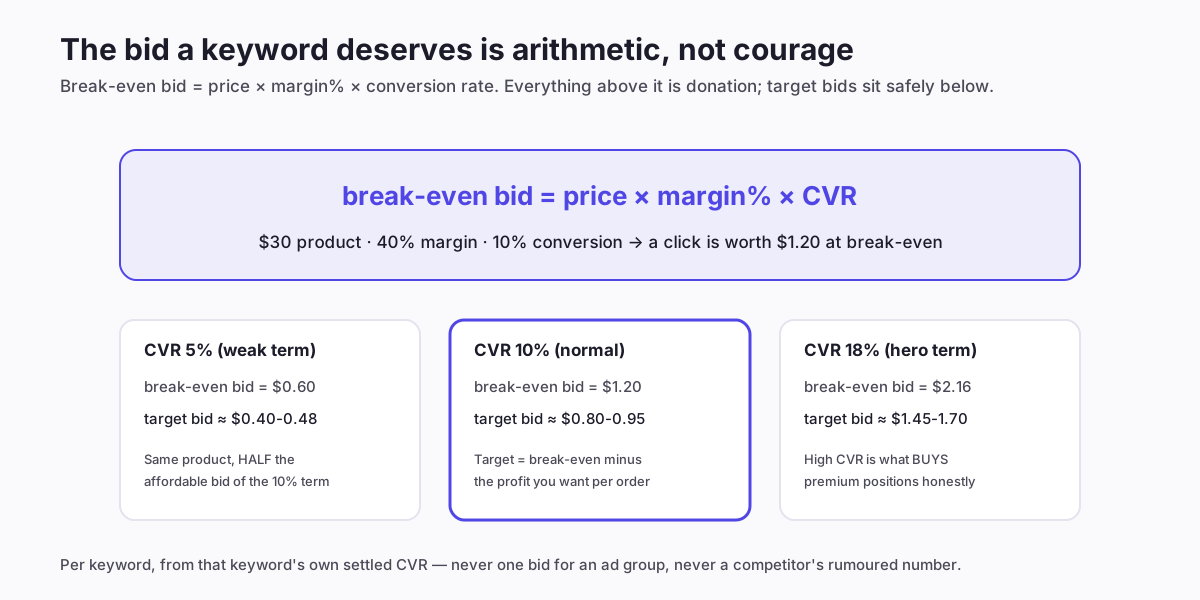
Walk it once: if a $30 product keeps 40% margin ($12) and a keyword converts 10% of its clicks, then ten clicks produce one order and $12 of margin — so ten clicks can cost at most $12, or $1.20 per click, before the keyword loses money. That is the break-even bid. Your target bid sits below it by the profit you want per order: keeping a third of margin as profit puts the target near $0.80.
Three properties of the formula do most of the strategic work:
- It's per keyword. CVR varies wildly between terms on the same product — which is why one ad-group-wide bid is always wrong for most of its members (mistake 9).
- It moves when CVR moves. Seasonality, competitors, listing changes — the bid that was right in September is stale by November, which is the entire case for the lifecycle below.
- It explains "expensive" keywords honestly. A keyword you "can't afford" is one whose CVR doesn't support the going rate — the auction isn't too pricey, your conversion is too weak for that term, and the fix (if any) is on the listing side.
Where the inputs come from (and their traps)
The formula is only as honest as its three inputs:
- Margin: after product cost AND all Amazon fees — referral, fulfilment, storage amortised. Sellers using gross margin overbid structurally, forever. The profit calculator and break-even calculator exist to make this a two-minute task per product; the true-profit view keeps it honest over time.
- CVR: the keyword's own, from the targeting report, on a settled window — recent days undercount orders (attribution lag) and thin samples lie in both directions. Under ~30 clicks, borrow: use the product's blended CVR as the prior and let the keyword's own data take over as it accumulates.
- Price: the selling price — which means deals rewrite bids: a 25% discount cuts the affordable bid by more than 25% (margin compresses faster than price). Event bidding without recomputing is how profitable products lose money on their best weekend.
Deliberately absent from the inputs: competitor bids, suggested-bid ranges, and impression-share targets. All three describe the auction; none describes what a click is worth to you. They're context at most, never the number.
The bid lifecycle: four phases
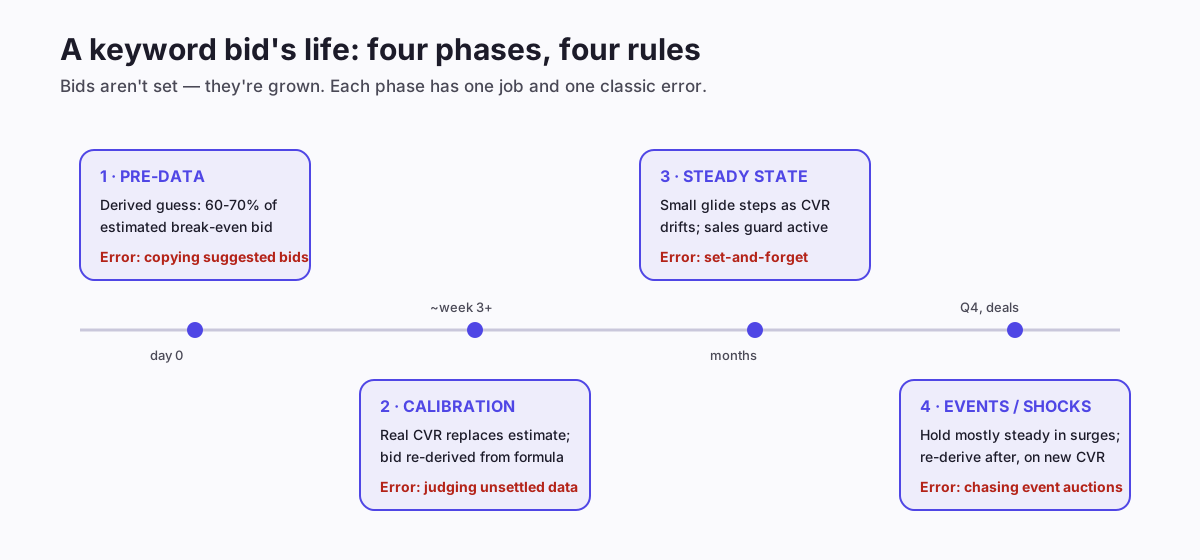
Phase 1 — pre-data: no CVR exists yet, so the bid is a derived guess: conservative CVR estimate into the formula, opened at 60-70% of the result (the setup guide's arithmetic). The phase's only job is generating clean data cheaply.
Phase 2 — calibration: around week three, real settled CVR replaces the estimate and the bid re-derives — sometimes sharply, in either direction. This is the one phase where a larger single adjustment is legitimate: you're not reacting to performance, you're correcting an estimate.
Phase 3 — steady state: the long middle. CVR drifts; the bid follows in glide-path steps (~5%, settled weeks, sales guard). Most weeks the correct step is zero — the discipline is checking, not changing.
Phase 4 — events and shocks: during surge weeks, hold mostly steady (your calibrated bid is still roughly right; chasing the inflamed auction rarely is), let budgets do the event work, and re-derive after — on post-event CVR, which events often permanently shift.
Dynamic bidding: what Amazon's settings actually do to your number
Amazon's campaign-level bidding strategies modify the bid you set, so they belong in the arithmetic:
- Dynamic — down only: Amazon may reduce your bid in auctions it predicts won't convert. Effectively a free discount on your worst impressions; the default recommendation for nearly everyone, nearly always.
- Dynamic — up and down: Amazon may also raise your bid (substantially for top-of-search) when it predicts conversion. Read that literally: your entered bid stops being a ceiling. If you use it, enter bids correspondingly below target so the raised effective bid lands where your formula wanted — most sellers who "tried up-and-down and got burned" simply left formula-level bids in place and let the multiplier stack on top.
- Fixed bids: your number, always, even on impressions Amazon would have discounted. Occasionally right for tightly-controlled SKCs where you want clean data; expensive as a default.
- Placement modifiers stack on all of the above — a +30% top-of-search modifier on an up-and-down campaign can more than double your entered bid at the top slot. Multipliers multiply; audit the effective bid (placement report, CPC column) rather than the entered one.
Raising bids: the half nobody writes about
Bid strategy discourse skews toward cutting, but the formula points up as often as down. Legitimate raises:
- CVR outgrew the bid. A listing improvement or review milestone lifted conversion; the old bid now under-prices the term, ceding position on your best traffic. The formula says raise — in steps, like everything else.
- Starved winners. A term profitable at its current position whose campaign caps out is asking for budget, and often for bid: if impression share is low and ACoS sits well under target, a step up buys volume the economics already approved.
- Strategic over-bidding with an end date: launches buying rank deliberately run above break-even — a decision, not a drift — and the exit date is part of the decision.
The guard on all raises is the same sales-side check as cuts: a raise that buys position without proportional orders was answered by the auction — the position wasn't worth it, step back down.
Worked example: one product's bid sheet
The formula applied across a real-shaped keyword set — $30 bottle, 40% margin, target = two-thirds of break-even:
- "insulated water bottle" — settled CVR 11%, break-even $1.32, target $0.88, current bid $0.85: hold. Inside the noise band.
- "water bottle for office" — CVR 16% (niche intent match), break-even $1.92, target $1.28, current $0.90: step up — the account's most underpriced asset, likely losing winnable impressions.
- "steel bottle" — CVR 6%, break-even $0.72, target $0.48, current $0.95: glide down — every click donates ~$0.23 of expected margin. Also flag: why is CVR weak? Broad term, mixed intent — maybe correct, maybe a match-type restructure.
- "bottle 750ml" — 19 clicks, no orders yet: no verdict. Borrowed product CVR keeps its bid at $0.80; the thin-data rule protects it from both panic and negation.
Twenty minutes for a full product, once the inputs live in a sheet — and the same twenty minutes every week thereafter, which is precisely the sustainability problem the next section addresses.
Bid myths the formula quietly retires
Held against the arithmetic, several durable bidding beliefs dissolve:
"Bid high initially for rank, always." Sometimes — as a decision with an end date and a rank goal, priced as an investment (phase-1 launches). As a default it's just donation: the auction happily accepts overpayment forever and issues no refunds when you notice.
"Match competitor bids or lose." You can't see competitor bids, only rumours and suggested-bid ranges — and even if you could, their arithmetic isn't yours. A competitor with 55% margin and an 18% CVR should outbid your 35%-margin 9%-CVR listing on the same term; matching them means losing money at scale they can afford. The formula tells you your ceiling; the auction tells you whether that ceiling wins anything. When it doesn't, the answer lives in CVR (listing work) or margin (pricing), not in courage.
"Lower bids always lower ACoS." Only when the bid exceeded the conversion-supported level. Below it, cuts shed profitable volume and rank — ACoS often worsens on the shrunken base (the diagnosis guide's recurring cautionary tale).
"There's a best bid per keyword." There's a best bid per keyword per CVR regime — and CVR moves with seasons, reviews, price changes and competitors. The formula isn't a one-time answer; it's a standing relationship between three numbers, which is why the lifecycle exists.
Bidding at scale: the honest arithmetic of time
The per-keyword formula is easy; the multiplication is not. Fifty meaningful keywords across ten products is five hundred bid decisions, each wanting settled-window checks, seasonal re-derivation, event handling and placement auditing. Weekly, forever. The manual version survives on small catalogs and dies quietly on growth — usually into the one-bid-per-ad-group compromise the formula exists to prevent.
This is the specific thing AIAdKing's nightly cycle automates most directly: every bid re-derived every night from current settled CVR, margin and price (deal prices included), stepped on glide paths with sales guards, dynamic-bidding and placement multipliers audited as effective bids, and every change logged with the arithmetic that produced it — inspectable in shadow mode before it applies. The formula stops being a weekly discipline and becomes a property of the account. Flat fee, details here.