
The mechanism: one flat bid, twenty-four different auctions
Your bid is a price for a click. But a click at 2am and a click at 9pm are different products: the same search from the same shopper carries different purchase intent at different times — late-night browsing, lunchtime comparison, evening buying. Conversion rate by hour routinely swings far more than sellers expect, and a flat bid prices every hour at the average.
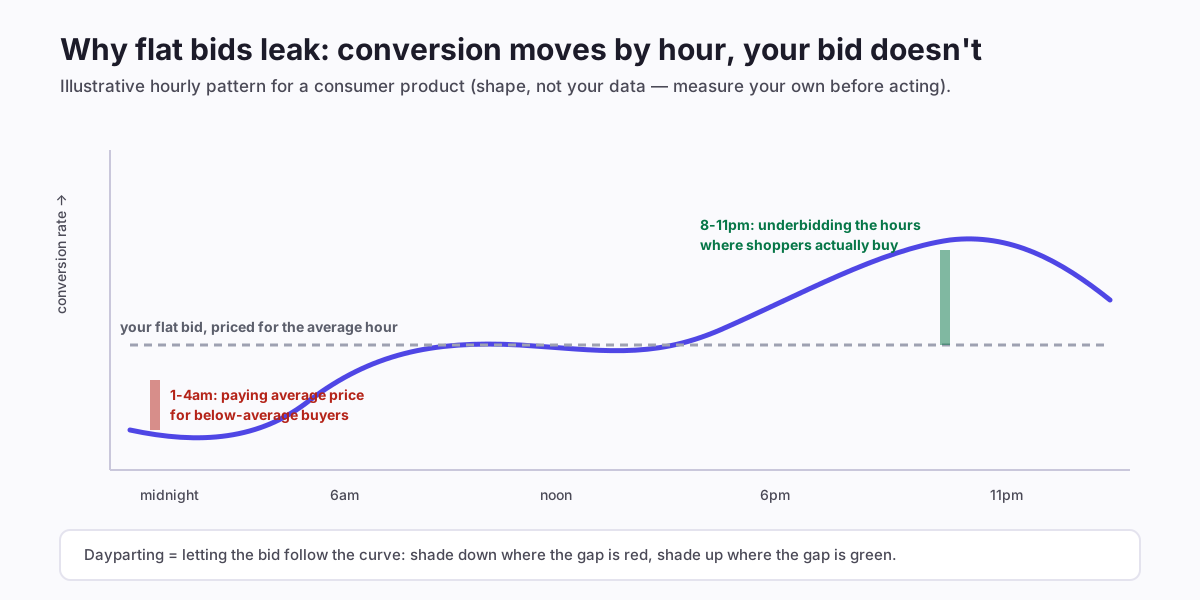
The leak runs both directions. In the red gap you're overpaying: average-price clicks from below-average buyers. In the green gap you're underbidding: the auction positions you concede at 9pm belong to the exact hours your product sells. That second half is the part naive "turn ads off at night" advice misses entirely — most of dayparting's value is shading up at the right hours, not just down at the wrong ones. The same logic drives budget pacing: a daily budget that exhausts by mid-afternoon is a de facto dayparting schedule someone else chose for you — one that reserves your money for the morning and goes dark for the evening peak.
Where hourly data actually comes from (the part guides skip)
Here's the honest complication: Amazon's standard reporting is daily. Hour-level performance is not sitting in a report most sellers can just download — the console's standard exports aggregate by day, and hourly breakdowns via the reporting API have historically been unreliable to unavailable for many account types. Real dayparting systems get hourly truth one of two ways:
- Amazon Marketing Stream — a push feed of near-real-time performance deltas that serious tools subscribe to and aggregate into hourly curves. This is the production-grade source, and it requires API infrastructure a spreadsheet can't replicate.
- Patient inference — accumulating your own timestamps: intraday spend snapshots, order timestamps from seller reports, and week-over-week aggregation until hourly patterns emerge from the noise.
The practical consequence: manual dayparting is data-limited before it's discipline-limited. You can approximate — order timestamps alone reveal your buying hours reasonably well — but precision bid-shading by hour is one of the few PPC levers where tooling isn't optional, which is why we wired it into AIAdKing's dayparting rather than telling sellers to build spreadsheets. Whatever you use: distrust any tool that won't say where its hourly numbers come from.
The four failure modes (and their guards)
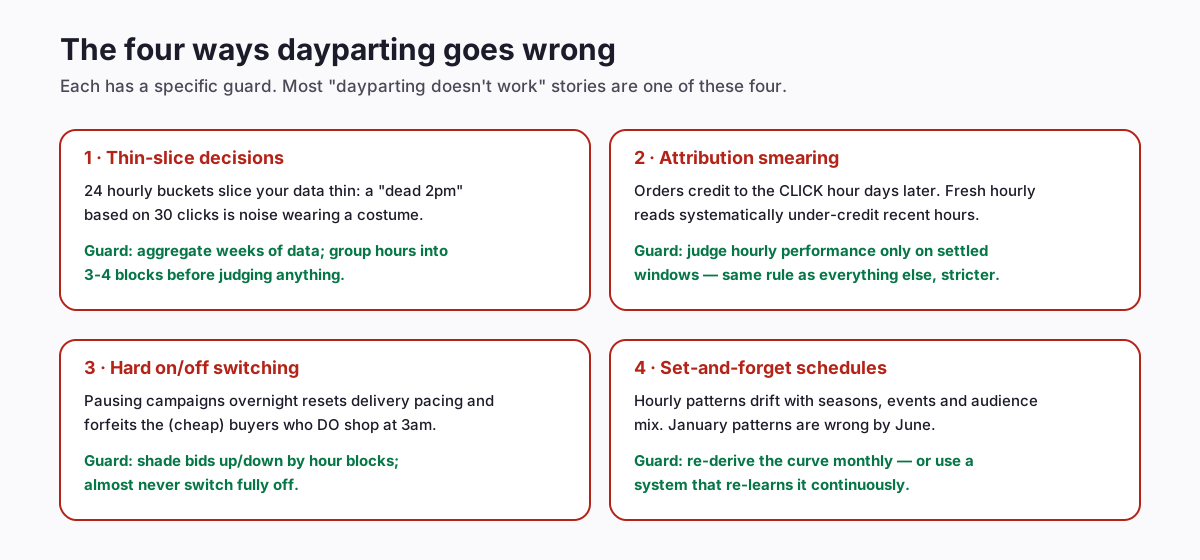
The first two deserve expansion because they compound. Slicing a normal account's data into 24 hourly buckets divides an already-modest sample by 24 — so a week of data gives you buckets where one random order flips an hour from "dead" to "great". And Amazon's attribution stamps orders back onto the click's hour days later, which means recent hourly data is systematically incomplete in a pattern that looks like evening hours underperforming (their conversions simply haven't landed yet). Combine the two and an eager seller reliably concludes their best hours are their worst. The guards: group hours into 3-4 behavioural blocks (overnight / morning / afternoon / evening), aggregate several weeks, and only ever judge on settled windows.
A safe starter framework: blocks before hours
You don't need 24-hour precision to capture most of the value. The starter version:
- Find your buying blocks. Export order timestamps for 4-8 weeks (seller reports carry them even when ad reports don't). Bucket into four blocks and compare each block's share of orders to its share of the day. Most products show one clearly strong block and one clearly weak one.
- Shade, don't switch. Start with ±15-25%: bids down in the weak block, up in the strong one, untouched elsewhere. Hard on/off scheduling resets Amazon's delivery pacing and forfeits the cheap conversions that do happen off-peak — shading keeps you present everywhere at hour-appropriate prices.
- Protect the budget for the strong block. If the campaign ever caps out before your buying hours, that's a worse leak than any bid mistake — fix pacing first.
- Judge after two settled weeks per adjustment, on block-level ACoS against your break-even. Keep what held sales; revert what didn't.
- Re-derive monthly. Curves drift with seasons and events — a schedule is a snapshot, not a law.
When dayparting is the wrong tool
Honesty about scope keeps the lever useful:
- Low-volume products. Under a few clicks per hour-block per day, you cannot measure hourly differences faster than they drift. Fix the bigger leaks first; dayparting is a refinement on top of a working account, not a rescue for a broken one.
- During deal events. Event traffic rewrites the hourly script — event days concentrate buying into surge windows that don't match your normal curve. Suspend normal schedules during events; resume after.
- As a substitute for negation and bid-sizing. If search-term waste is leaking a tenth of your spend (the measured norm), hour-shading rearranges deck chairs. The order of operations from the lower-ACoS playbook applies: waste, bids, conversion — then hours.
One more honest boundary: multi-marketplace sellers need per-marketplace curves in local time. An account serving amazon.com and amazon.in has two completely different "9pm"s — collapse them into one schedule and both are wrong.
What good looks like after 60 days
Expectations calibrated: dayparting's win condition is a few points of blended ACoS improvement at equal-or-better sales — meaningful and compounding, not transformative. The visible signature after two months of block-shading, judged on settled windows: weak-block spend share down several points, strong-block order share up, and total orders flat or better. If total orders fell, you shaded too hard into hours that were quietly feeding attribution to other hours — soften the down-shades and re-judge.
The deeper win is composure: an account whose bids follow its real hourly demand stops generating the 2am-spend anxiety that drives sellers toward the destructive version of this idea (turning everything off at night). The goal was never to spend less at night; it was to pay night prices for night traffic.
Reading your order timestamps: a 30-minute starter analysis
Before any tool or schedule, run this once — it costs half an hour and tells you whether dayparting has anything to offer your specific products:
- Export 8 weeks of orders from seller reports (they carry purchase timestamps even though ad reports aggregate daily). Convert to your marketplace's local time — a step sellers in different home timezones routinely miss, and which silently shifts every conclusion by hours.
- Bucket into the four blocks (overnight 12-6, morning 6-12, afternoon 12-6, evening 6-12) and compute each block's share of orders next to its share of hours (25% each).
- Look for a gap of ten points or more. An evening block at 38% of orders is a real signal; 27% is noise. Most consumer products show one strong and one weak block; some (office supplies, B2B-adjacent) invert the pattern entirely — which is precisely why borrowed schedules from blog posts misfire.
- Sanity-check against weekday/weekend — if your weekend curve differs wildly from weekdays, you have two schedules, not one, and shading should respect both.
If the analysis shows a real gap, the block-shading framework above has something to harvest. If it shows mush, you've spent thirty minutes learning that your money is better directed at the bigger leaks — an excellent trade either way. Re-run the analysis quarterly; the curve you measured in October (deal season) will not be the curve of a quiet February.
Hour-aware bidding without the infrastructure
Everything above — Stream-grade hourly data, block curves per product per marketplace, shading with guards, monthly re-derivation, event suspension — is the infrastructure-heavy end of PPC. It's also, for exactly that reason, one of the clearest cases for automation: AIAdKing's hour-aware bidding runs inside the nightly cycle with each seller's own timezone-correct curves, re-learned continuously, guarded by the same settled-window and sales-guard rules as every other bid decision — and every hourly shade is logged with its reasoning, previewable in shadow mode. Flat monthly fee, details here.